bun-wtui
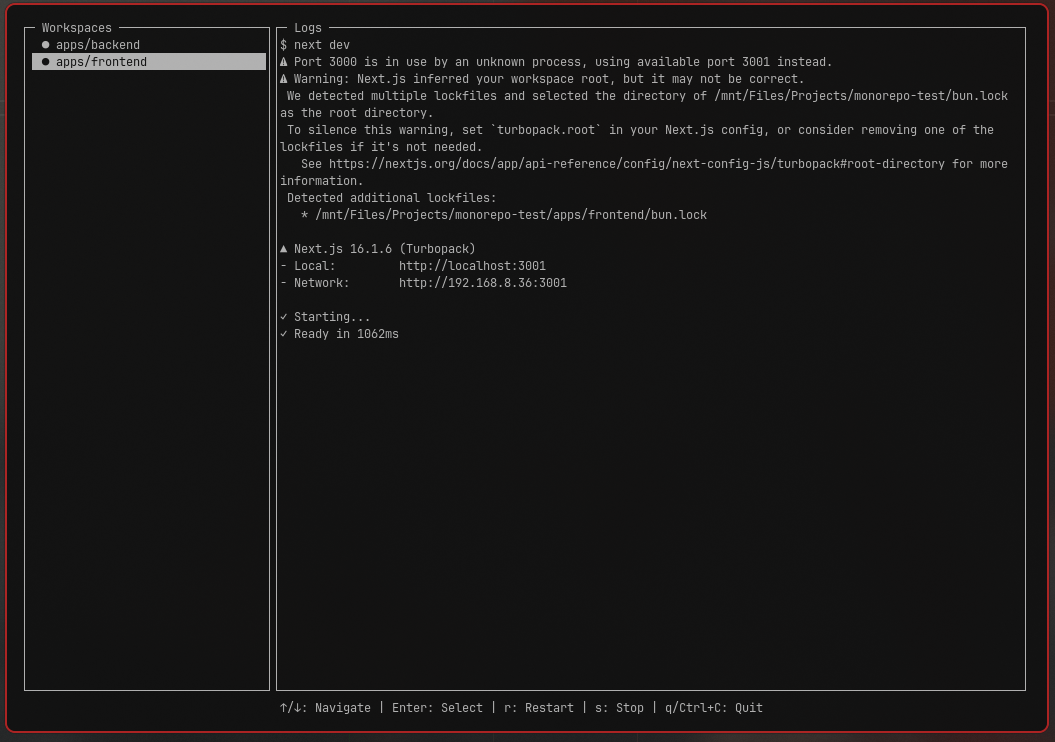
Neovim-style TUI dashboard for Bun workspaces.
Bun-Wtui
Neovim-style TUI dashboard for Bun workspaces.
Bun-Wtui is a lightweight terminal UI that lets you navigate your monorepo workspaces from a sidebar and view live logs in a split panel layout. It’s designed for developers who want something simpler than heavy task runners — just clean navigation and logs.
inspired by: Turborepo
Features
- Sidebar workspace navigation (↑/↓)
- Tree-style workspace explorer (optional)
- Live log viewer for selected workspace
- Restart selected workspace (
r) - Stop selected workspace (
s) - Lint dependencies in overlay (
l) - Fix dependency mismatches in overlay (
f) - Quit instantly (
qorCtrl+C) - Auto-detects Bun workspaces from
package.json - Running status indicators (● running / — stopped)
- ▌ Active workspace indicator
- Expandable/collapsible directory nodes in tree view
- Works with any Bun monorepo
- Powered by syncpack for dependency management
Examples

Installation
bun add -d bun-wtui
recommended to add -d flag as devDependencies
Add this to your root package.json:
{
  "scripts": {
    "dev": "bun-wtui"
  }
}
Then run:
bun run dev
CLI Commands
bun-wtui {commands}
help: Show command flags
tui: Show deafult tui
lint: List workspaces dependencies issues
fix: Fix workspaces dependencies issues
How It Works?
BunTUI:
- Reads your root
package.json - Detects
"workspaces" - Lists them in a sidebar
- Runs
bun run devinside the selected workspace - Streams logs to the right panel
- Lint and Fix dependencies issue comes from
syncpack
No extra config required.
Controls
List View (default)
| Key | Action |
|---|---|
| ↑ / ↓ | Navigate workspaces |
| Enter | Select workspace |
| r | Restart selected workspace |
| s | Stop selected workspace |
| l | Lint dependencies (overlay) |
| f | Fix mismatches (overlay) |
| ESC | Close overlay |
| q | Quit |
| Ctrl+C | Quit |
Tree View (when enabled)
| Key | Action |
|---|---|
| ↑ / ↓ | Navigate workspaces/folders |
| Enter | Select workspace or expand dir |
| r | Restart selected workspace |
| s | Stop selected workspace |
| l | Lint dependencies (overlay) |
| f | Fix mismatches (overlay) |
| ESC | Close overlay |
| q | Quit |
| Ctrl+C | Quit |
Configuration (Optional)
Bun-Wtui works with zero configuration, but you can customize behavior by creating a config file in your project root:
bun-wtui.json.bun-wtui.jsonconfig/bun-wtui.json
Example configuration:
{
  "ui": {
    "theme": "dark",
    "minWidthForLandscape": 80,
    "sidebarWidth": 25,
    "showTimestamps": false
  },
  "workspace": {
    "excludeWorkspaces": [],
    "autoDetectWorkspaces": true,
    "treeViewEnabled": false
  },
  "syncpack": {
    "dependencyTypes": ["prod", "dev"],
    "autoLintOnStart": false
  },
  "behavior": {
    "logLevel": "normal", // "verbose" | "normal" | "quiet"
    "rememberLastWorkspace": false
  }
}
Config Options:
| Option | Type | Default | Description |
|---|---|---|---|
ui.minWidthForLandscape |
number | 80 | Terminal width threshold for side-by-side layout |
ui.sidebarWidth |
number | 25 | Sidebar width percentage in landscape mode |
ui.showTimestamps |
boolean | false | Add timestamps to log entries |
workspace.excludeWorkspaces |
string[] | [] | Workspace paths to hide from sidebar |
workspace.autoDetectWorkspaces |
boolean | true | Automatically detect workspaces from package.json |
workspace.treeViewEnabled |
boolean | false | Enable hierarchical tree view for workspaces |
syncpack.dependencyTypes |
string[] | ["prod", "dev"] | Dependency types to check |
syncpack.autoLintOnStart |
boolean | false | Automatically run lint on startup |
behavior.logLevel |
string | "normal" | Log verbosity (verbose/normal/quiet) |
behavior.rememberLastWorkspace |
boolean | false | Remember last selected workspace |
See bun-wtui.json.example for a complete example.
Supported Workspace Format
Example:
{
  "workspaces": [
    "apps/*",
    "packages/*"
  ]
}
Each workspace must have a dev script:
{
  "scripts": {
    "dev": "next dev"
  }
}
Philosophy
Bun-Wtui is not a task graph engine.
It does not cache builds. It does not optimize pipelines. It does not manage dependencies.
It simply:
Shows your workspaces Lets you navigate Streams logs cleanly
Minimal. Focused. Fast.
Roadmap
- Memory usage display
- Config file support
- Custom script flag (
--script build) - Tree-style workspace explorer
🛠 Development
Build locally:
bun run test
Test:
run this on a sandbox project
bun link bun-wtui
Run:
bun bun-wtui
Publishing
Bump Version
npm version patch  # 1.0.1 -> 1.0.2
npm version minor  # 1.0.1 -> 1.1.0
npm version major  # 1.0.1 -> 2.0.0
Publish to npm
npm publish